


Modiface Haircut:Hair Makeover
3.9765.00 Reviews
App Specs
- Version
- 34.1.4
- Updated On
- License
- Free
- Downloads
- 1,000,000+
- Developer
- One Music Player
- Categories
- Beauty
- Platform
- Android
Screenshots
 Analysis by AppCompare
Choosing a new haircut is exciting until I have to picture it on my own face. That is where Modiface Haircut: Hair Makeover can help: it gives me a way to explore possible looks before I make a real-world change. I treat it as a visual brainstorming tool, not a promise of exactly how a salon result will turn out. That distinction makes the experience more useful and keeps expectations realistic.
What to expect from a virtual hair preview
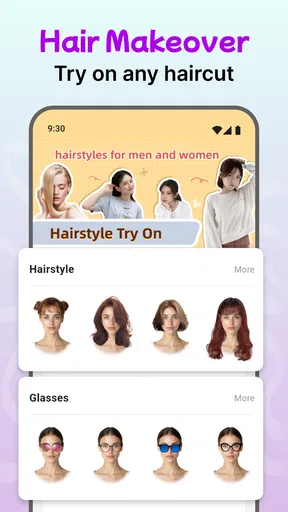
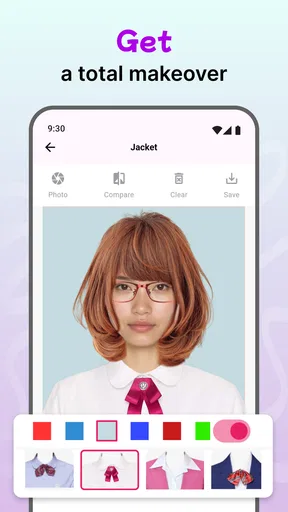
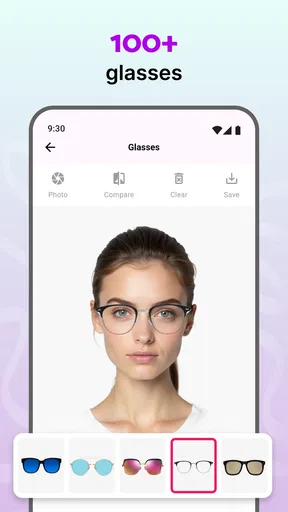
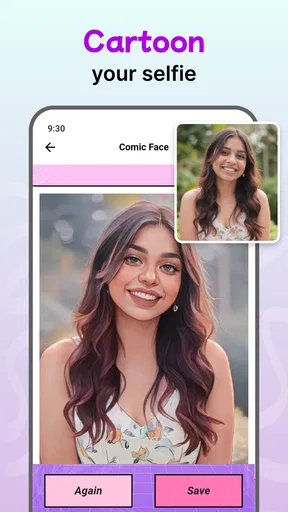
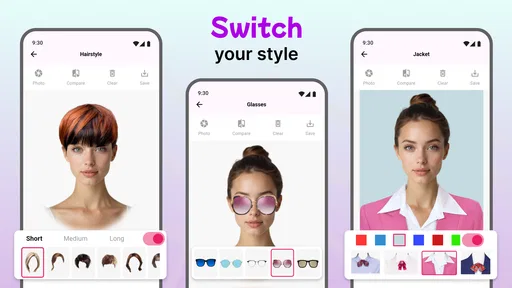
This is a beauty app from One Music Player, built around trying different hair looks on a photo, with glasses, jackets, and cartoon-style face effects also part of its makeover theme. It is free to install, with optional in-app purchases ranging from $0.99 to $99.99 per item. The app is rated for Everyone, and its current version is 34.1.4; it runs on Android 5.0 and later. It has a 4.1 average from around 24,000 ratings and over a million installs, so it has reached plenty of people looking for a quick style preview.
The main appeal is immediacy: rather than searching for a model whose face and coloring resemble yours, you can use your own image as a starting point. That makes it easier to compare the overall impression of a shorter cut, a different color, or a more playful look. I would not use a preview as a technical reference for a hairdresser, though. A photo cannot show how a style behaves when you move, how your natural texture changes the shape, or how much daily styling a cut might need.
Getting Started with Your Virtual Makeover
Jumping into Modiface Haircut: Hair Makeover is as easy as pie. The interface is super user-friendly. Once you've downloaded the app, you're just a selfie away from trying on a multitude of hairstyles. Snapping a good photo is crucial here. Make sure you have decent lighting, and if you can, get a friend to help you out. The app does a remarkable job of mapping hairstyles onto your photo, but the better the pic, the better the fit.
Make the first photo work for you
For a first try, I would choose a straight-on photo with your face clearly visible, a relaxed expression, and hair kept away from the parts of your face you want to compare. A plain background can also make it easier to judge the outline. The useful trick is to keep the first image simple instead of trying to make it look like a finished portrait. If the preview seems misplaced, check the photo angle and lighting before deciding that a particular hairstyle does not suit you.
Once you have a starting image, change one thing at a time. Compare a few cut shapes while keeping the color similar, then test color choices on the options you like best. This makes the differences easier to read than changing the cut and shade together in every attempt. It also gives you a more practical shortlist to show someone whose opinion you trust, rather than a camera roll full of unrelated experiments.
Your first useful comparison
A good first success is not finding a perfect, final look; it is narrowing the field. I would save or share two or three options that feel meaningfully different, then ask what stands out about each: the length around the face, the amount of contrast from the current color, or whether the silhouette feels too bold. That kind of feedback is more actionable than asking friends to pick a winner from a dozen near-identical edits.
Worth Reading Before You Choose

Baby Panda World Brings Quick Play to Modern Phones, but Its Game Library Feels Busy

ESPN’s Live Game View Makes Following Close Games Easier

QuizzLand Review: A Good Fit for Short Trivia Breaks, Not Every Player

Basketball Stars: Multiplayer Is Fast, but Can It Recover When Matches Go Wrong?

WEBTOON Turns Phone Updates Into a Better Reading Routine

Link to Windows Runs on Shared Habits, Not Social Feeds
For example, imagine you have a salon appointment coming up and are tempted to go much shorter. You can use a preview at home to decide whether you prefer a cropped shape or a longer version that still feels like a change. Then bring the image as a conversation starter, while explaining that your actual texture and styling routine may affect the result. The app helps you clarify what you like; your stylist can translate that preference into a cut that works in real life.
Features Galore
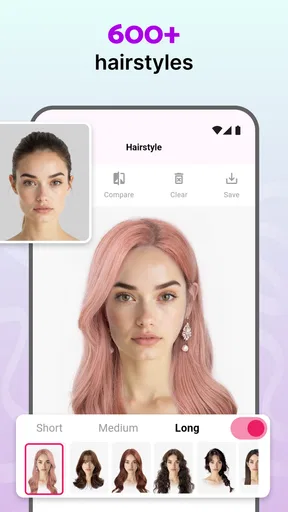
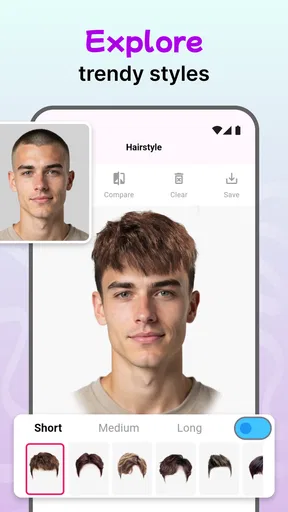
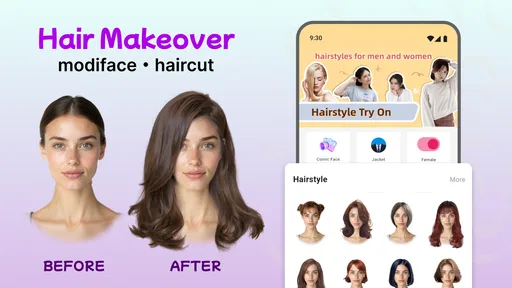
Once you're set up, the world of virtual hairstyles is your oyster. The app offers an extensive library of cuts, colors, and styles. Whether you're considering going platinum blonde or thinking about rocking a pixie cut, you can see how it looks on you with just a few taps. I particularly enjoyed the color-changing feature. It’s amazing how easily you can switch from brunette to fiery red, just for fun. Personalizing your look has never been this simple!
Use the options as a decision aid
Hair color previews are most helpful for comparing broad directions, such as warmer versus cooler shades or a subtle change versus a dramatic one. They are less dependable as a way to predict the exact shade you would get from dye, since lighting, screen settings, and your starting color all affect what you see. I use them to answer, “Do I like this general idea on me?” rather than, “Will this be the precise salon result?” That small adjustment in how you read the image prevents a fun preview from becoming an unrealistic expectation.
The other makeover elements can help you think about the whole impression rather than hair in isolation. Trying glasses or a jacket alongside a hairstyle may be entertaining, but it can also make a comparison less clear if several elements change at once. When I want a useful hair decision, I keep the rest of the look steady; when I am simply playing with a new style, I let myself mix things up. Separating those two goals makes the app feel less confusing.
Why It Stands Out
What makes this app a cut above the rest is its accuracy and ease of use. The hairstyles align quite well with your photo, giving you a realistic preview. I’ve tried other apps where the hair looks like a sticker slapped onto your head, but not here. The developers really did their homework to make sure the hair looks natural and blends well with your face shape and skin tone.
Where a preview has limits
Even a convincing image is still a still image. It cannot tell you whether a fringe will fall into your eyes, whether a layered cut will take effort each morning, or whether a color will need more upkeep than you want. Nor should a flattering overlay be treated as a guarantee that every option will sit perfectly on every photo. If the result looks odd, try adjusting the source image before ruling out the style; if the same issue persists, it may simply be a limitation of a digital preview.
That is also why I would not use this as a substitute for professional advice when the decision involves a major change. A stylist can consider your hair’s actual condition, texture, growth pattern, and maintenance needs in a way a photo-based makeover cannot. The app is strongest before that conversation: it helps you arrive with a clearer sense of the shape or mood you want, rather than expecting it to make the decision for you.
How it compares with other ways to experiment
Compared with browsing hairstyle photos online, trying a look on your own image makes the choice feel more personal and can quickly rule out directions you do not enjoy. Compared with asking a salon for a consultation, it is convenient and low-pressure, but it cannot assess your hair in person or explain what the cut will demand day to day. I see it as the middle step between collecting inspiration and having a real conversation with a stylist.
It is also a different kind of experience from a dedicated photo editor. A general editor may offer more control over individual details, while this app is focused on rapid makeover experimentation. That simplicity is a strength when you want to explore without learning a complicated editing workflow; the trade-off is that anyone seeking precise retouching or fine control over every strand may be better served by a more specialized editing tool.
Some Handy Tips
- Experiment with lighting: Different lighting can change the appearance of hair colors, so try out various conditions to see what suits you best.
- Share with friends: The app allows you to easily share your new looks with friends, which is a great way to get some second opinions before making any drastic changes.
- Take your time: With so many options, don't rush. Enjoy the process and have fun exploring different styles.
Who will get the most from it?
I would recommend it to someone who is curious about a change but not ready to commit, especially if they find it hard to imagine how a different length or shade might frame their face. It can also be a light, social activity: you can test a few deliberately different looks and share them for reactions without turning the exercise into a serious makeover plan. Its free entry makes it easy to try, though the presence of optional purchases means I would pay attention to any purchase prompt and decide whether an extra item is worth it before proceeding.
On the other hand, I would skip it if you need an exact preview for a haircut appointment, want a detailed hair-care consultation, or are mainly looking for advanced photo-editing controls. It is also not the right tool if you expect a digital image to settle a personal decision by itself. Your comfort, routine, and willingness to maintain a style matter just as much as whether the preview looks appealing.
Final Thoughts
Modiface Haircut: Hair Makeover is a fantastic tool for anyone considering a change in their hairstyle. It’s not just about the fun of trying on new looks; it’s a genuinely helpful app for making informed decisions about your next salon visit. Whether you're planning a drastic transformation or just a subtle tweak, this app gives you the confidence to know exactly what you’re getting into. So why not give it a go and unleash your inner hairstylist? You might just find your next signature look!
My practical recommendation is to begin with one clear photo, test a small set of contrasting options, and use the results to describe what you like rather than demand an exact copy. If you enjoy playful previews and want a low-stakes way to explore possibilities, it is an easy app to try. If accuracy about texture, upkeep, or the final cut is your priority, take your shortlist to a stylist and let their real-world judgement complete the picture.
Pros
- Realistic hair color simulation.
- Wide range of hairstyle options.
- User-friendly interface.
- Instant before-and-after view.
- No account required for basic use.
Cons
- Limited free features.
- Occasional app crashes.
- Requires good lighting for accuracy.
- Some styles appear unrealistic.
- Ads can be intrusive.
FAQs for Modiface Haircut:Hair Makeover
What is Modiface Haircut: Hair Makeover?
Modiface Haircut: Hair Makeover is an innovative app designed to help users experiment with different hairstyles and colors using augmented reality. By simply uploading a photo or using live mode, you can try out numerous styles to see what suits you best before heading to the salon.
How accurate are the hairstyle simulations in Modiface Haircut?
The app uses advanced augmented reality technology to provide realistic and accurate hairstyle simulations. While it offers a close approximation, actual results may vary slightly due to individual hair texture and lighting differences. It's a great tool for visualizing potential changes before making a decision.
Can I use Modiface Haircut for color changes as well?
Yes, Modiface Haircut allows users to experiment with a wide range of hair colors. You can try anything from subtle highlights to bold, vibrant colors, helping you find the perfect shade that complements your style and skin tone.
Is Modiface Haircut suitable for both men and women?
Absolutely! Modiface Haircut offers a diverse selection of hairstyles suitable for all genders. Whether you're looking for a classic cut or something trendier, the app provides options for everyone, making it a versatile tool for style experimentation.
Are there any in-app purchases required in Modiface Haircut?
While Modiface Haircut is free to download, it does offer in-app purchases. These may include additional hairstyle options and advanced features. However, the basic functionalities provide a substantial range of styles for free, allowing users to explore without immediate cost.


